
If you’ve recently signed up on our platform and are excited to explore its range of games, from colour prediction to card games, you’ll first need to deposit money into your Daman wallet. Sounds like a big deal? Don’t worry. It's a smooth and easy process that takes just a few minutes. And we're here to walk you through it step by step.
Before you try to load money into your daman game wallet, make sure you have:
Once you have fulfilled all the preliminary steps listed above, follow the steps mentioned below to deposit the money into your account.
Below are the steps to participate in the promotion program:
Step 1: Login to Your Daman Account
Log into daman game account with your mobile number and password:
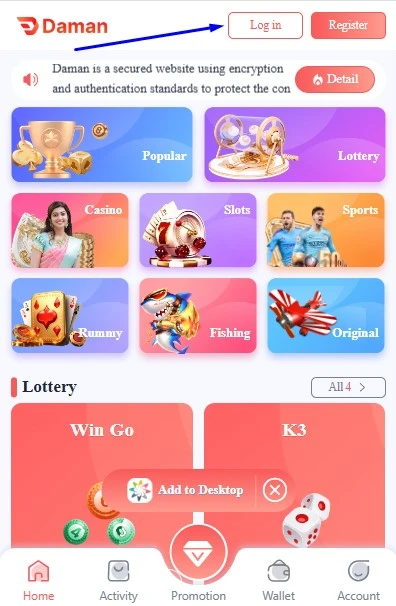
Step 2: Tap on “Wallet.”
Look for your wallet on the homepage.
Step 3: Click on ‘Deposit’
Tap the Deposit button to begin the process.
Step 4: Select the Amount
You can choose from presets like ₹100, ₹300, ₹500, or enter your own amount.
Step 5: Choose Payment Method
Options usually include:
Pick the one you prefer.
Step 6: Enter Payment Details
Input your UPI ID or wallet details as needed, and tap Proceed.
Step 7: Complete the Payment
You’ll be redirected to your chosen payment app to authorise the payment.
Step 8: Get Confirmation
Once successful, you'll return to the Daman app and see the amount added to your wallet.
It's usual to face issues while depositing money into the Daman account, but most of these issues can be resolved easily. Here are some common issues users may encounter:
Step 1: Transaction Failed Errort
You initiate the deposit, but it shows “Transaction Failed” after payment. This can happen due to:
Solution: In such a case, make sure to check your bank’s downtime. Check if the UPI is working fine. If nothing helps, wait for some time and then try again.
Step 2: Amount Deducted, Not Credited
This is the most frustrating one. You complete the payment, and money is deducted, but nothing shows up in your Daman wallet.
Solution: Don’t panic. Take a screenshot of the transaction and note the transaction ID. Reach out to Daman’s support team via their live chat. Most of the time, the money gets refunded or credited within 24–48 hours.
Step 3: UPI ID Invalid
If you’re typing your UPI ID manually and misspell even one letter, it can throw an “Invalid UPI” error.
Solution: Double-check your UPI ID. Open your UPI app and copy it directly to avoid mistakes.
Step 4: Slow or Stuck Payment Screen
Sometimes, after hitting "Proceed", the screen might hang or freeze.
Solution: Don’t refresh immediately. Wait for 30–60 seconds. If it’s still stuck, go back and check if the money is deducted. If not, restart the process.
Step 5: Wrong Bank/Wallet Chosen
You might accidentally pick a different payment app or bank that has no funds.
Solution: Always verify your source of payment and balance before proceeding.
Step 6: Server Downtime or Maintenance
Daman’s servers or payment gateway might be under maintenance. You’ll usually see a message like “Try again later” or “Temporary error”.
Solution: Just wait it out and try again in some time.
If you are not able to find out the solution to your problem related to daman game deposit. You can get it checked with the daman game support team via chat or email. They will respond in the meantime to resolve your query.
The very first step to playing the Daman game is to add funds to your game account. You can start by depositing a minimum of Rs 100 INR and start playing daman game. We have explained to you the complete steps to deposit funds into your Daman account. Make sure to follow all the steps as mentioned and if you face any issues, reach out to the support team.
You can deposit a minimum of Rs 100- Rs 200 in your account.
You can use payment methods like UPI, Bank transfer, or USDT to add funds to the game account.
It is usually added to your game account instantly; however, it can take a few minutes to reflect in your account.
In case you have added funds from your bank account to the game account and it doesn’t reflect, wait for some time. If nothing helps, reach out to the support team.
Most people prefer using UPI to add money since it is easily accessible
 Login
Login
 Download
 Login
Login
 Download