
If you have been using Daman games, you must have some winnings in your game account. It is now the right time to withdraw those winnings to your bank account. But the question is; How?
Although the process of withdrawing funds from the Daman app to the bank account is easy, it can still be overwhelming for new players. Here, we have come up with a complete guide on how to withdraw money from the Daman app for you.
Before you can withdraw any money from your Daman wallet, you must add and verify your bank account. In case the bank account is not added, it’s the first thing to do.
Here's a quick guide:
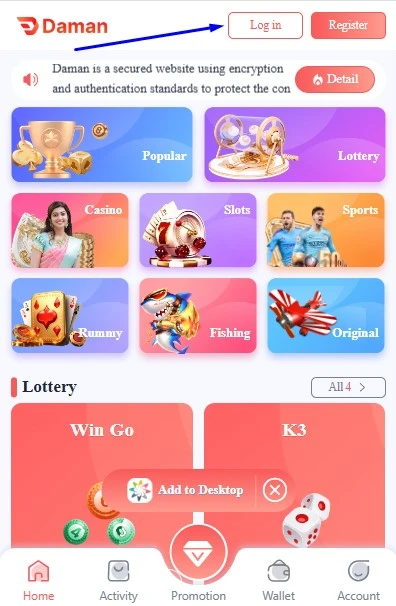
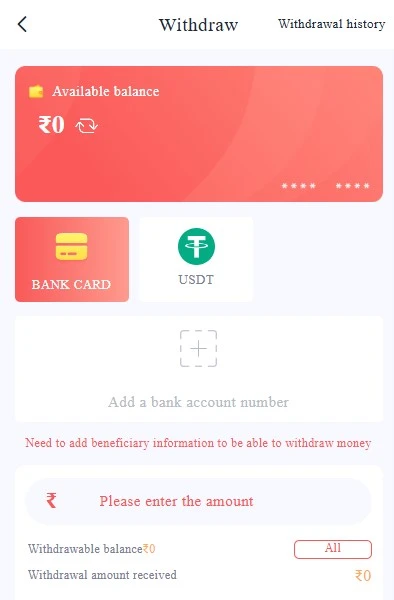
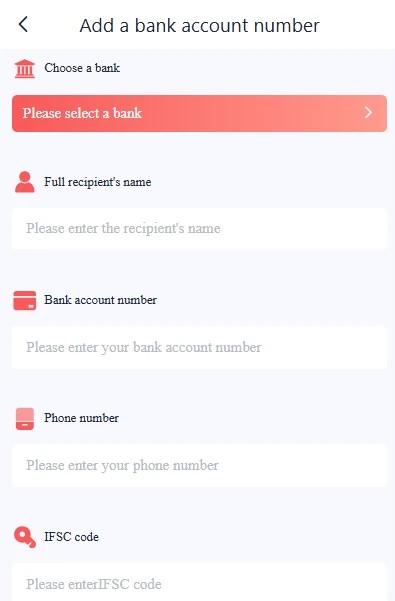
Once you have added your bank account, let’s understand the process to withdraw money from the Daman game account.
Step 1: Open the Daman Account
Start with logging in to your Daman game account by typing your username and password. Make sure that the device is connected to a stable internet connection.
Step 2: Go to the Wallet Section
On the homepage, the wallet tab will appear. Click on it to open the transaction-related options.
Step 3: Check Your Balance
Now, your available balance will be displayed. Note that the withdrawal limit is Rs 100, and hence, your account must have Rs 100.
Step 4: Add the Amount
Once done, type the amount you wish to withdraw from the game account.
Step 5: Select the Bank Account
From the added bank accounts, select the one to which you want to add money.
Step 6: Complete Withdrawal
Type your login password to authenticate the transaction.
Step 7: Click On Withdraw
YAfter adding all the details, click on the withdraw button. Wait till the amount is credited to the account.
Although the process to withdraw money is quite simple, some users can still face issues while trying to do so. Below we have listed some issues with their solutions for your reference:
Error 1: Balance Less than Withdrawal Limit
problem: It means that you are trying to withdraw more money from an available account
Solution: Check the balance in your account before you send in the withdrawal request. Save up your winnings if needed.
Error 2: Bank does not Support Digital Payment
problem: The bank may not support instant payment methods like UPI or IMPS
Solution: Try linking a bank that supports IMPS/UPI transfers. You can check with your bank if they allow third-party gaming transactions.
Error 3: App Not Updated Limit
problem: The app you are using is outdated
Solution: In such cases, make sure you update the app frequently. Outdated versions may have bugs or server issues.
Withdrawing money from the Daman game account takes a few seconds; however, it may take some time to reflect in your account. Above, we have guided you on each and every step to withdraw money from the Daman account to the bank account.
In case you still face issues even after following all the troubleshooting steps listed above, we recommend you reach out to the support team. The team is available 24/7 for your assistance.
You need to withdraw a minimum of Rs 100 INR from your account. Once you have the withdrawal limit, you can send the withdrawal request.
Yes, you need to add your bank account to withdraw money from your game account.
You can use payment methods like USDT and bank transfers to withdraw money from the game account to your bank account.
It takes a few minutes to withdraw money; however, it can take some time to reflect in your bank account.
In case the funds don't show in your bank account, wait for the recommended time, and if nothing happens, contact the support team.
 Login
Login
 Download
 Login
Login
 Download